How to Track Facebook Ads to Sales When You Sell on Calls
A five-step system for tracing every Meta ad to the booked call, the held call and the cash, so you scale the ads that produce buyers instead of form fills.
Aura Team9 min read
The short answer
To track Facebook ads to sales in a call funnel, capture the campaign, ad set and ad ID on every lead the moment they enter your booking form, keep that source on the lead through the call and the payment, and report revenue by ad from your own records. Then send booked, qualified and closed events back to Meta through the Conversions API. Ads Manager can't do this alone, because the sale happens days after the click.
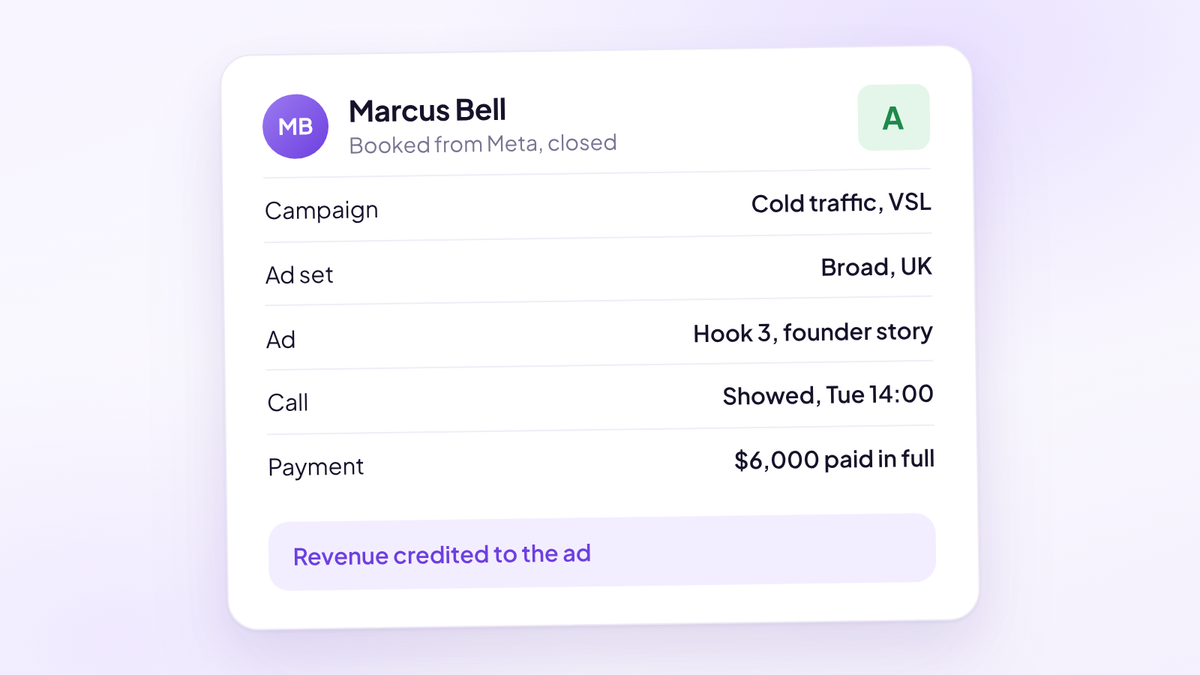
That's the short version. Here's how to build it, step by step, so that on Monday morning you can open one report and see which ads produced cash last week. It's one piece of a wider system, covered in full in our guide to sales attribution.
If you sell a $49 product, Meta's Pixel can see the checkout and most of this is solved. If you sell a $6,000 programme on a call, the Pixel sees a form and a calendar page. The payment happens on Zoom, gets taken through Stripe and lands in a spreadsheet. Meta never sees it unless you tell it.
Why Ads Manager can't tell you which ads close
Ads Manager reports what Meta can see and match. In a call funnel that's mostly page views, form submissions and bookings. Three things stop it from seeing the sale.
The sale happens off the website. Nobody buys on your landing page. They buy on a call, often after a second conversation or a partner check. No browser event fires when a closer takes a card over Zoom.
The window is shorter than your sales cycle. When you set up a conversion ad set, Meta lets you choose a 1-day or 7-day click-through window, a 1-day engage-through window and a 1-day view-through window (Meta Business Help Centre). Since January 2026, Meta's reporting API no longer returns the 7-day view and 28-day view windows at all (Meta for Developers). A lead who clicks on day one, books for day three and pays on day twelve has fallen out of the default window before the money arrives.
Meta counts what it matched, not what you banked. A booked call that no-shows and a booked call that paid in full both look like one "Schedule" event to the Pixel. The difference is your whole business.
So the house rule is simple. Pull your numbers from your booking system or CRM, never from the ad platform. Ads Manager tells you what you spent and what Meta thinks happened. Your own records tell you what you got.
The chain from ad to lead to call to cash
Tracking ads to sales is one unbroken chain. Each link has to carry the ad's identity forward to the next one. Break any link and the revenue lands in a bucket called "unknown".
| Link | What to record | Where it lives | What usually breaks it |
|---|---|---|---|
| Ad click | Campaign ID, ad set ID, ad ID, click ID | The landing page URL | Ads with no URL parameters |
| Lead | The same IDs, saved on the lead record | Booking form hidden fields | Scheduler redirects that drop the URL |
| Booked call | Source, grade, setter and closer | Calendar and pipeline | Rebooking creates a new, sourceless record |
| Held call | Showed or no show, outcome | Pipeline stage | Reps updating stages by memory |
| Cash | Amount, instalments, date | Payment processor matched to the lead | Payments logged against a name, not a lead |
Five steps build that chain.
Tag every ad with its IDs
Every Meta ad needs URL parameters, so the landing page knows exactly which ad sent the click. Meta fills these in for you with dynamic parameters: {{campaign.id}}, {{adset.id}}, {{ad.id}}, the name versions of each, {{placement}} and {{site_source_name}} (Meta Business Help Centre).
Use the IDs as your join key, not the names. Meta's own documentation says name-based parameters are fixed to the name the campaign, ad set or ad had when it was first published. Rename an ad later and the URL still carries the old name. IDs never change.
Set the parameters once, at account level in your launch checklist, so nobody publishes an untagged ad. Editing URL parameters on a live ad can push the ad set back into the learning phase, according to the same Meta article, so get them right before launch. Our guide to UTM tracking for call funnels has the full naming schema and a copy-paste string.
Capture the source at the booking form, before the calendar
This is where most call funnels lose the trail. The parameters arrive on the landing page, the lead clicks through to a scheduler on another domain, and the URL is gone.
Fix it with hidden fields on the booking form. When the lead types their name and email, the form saves the campaign, ad set and ad IDs, plus Meta's click ID, onto the lead record. Capture name and email first, before the calendar, so the source is saved even if they never pick a time.
Two details matter more than they look:
- Store the source on first touch and keep it. In Aura's data, a single lead often returns to the scheduler three or four times before booking. If the third visit comes from a Google search, a last-touch setup hands the credit to Google and your Meta ad looks dead.
- Store the click ID. Meta's click ID (the fbclid value in the URL, saved as the _fbc cookie) is what lets Meta match a later server event back to the click. Keep it with the lead, because you'll need it when the deal closes.
Keep the source on the lead through the call and the payment
Once the source is on the lead, every later event has to attach to that same record, never to a new contact or a row in a different tool.
- The booked call carries the source, the lead grade and the setter and closer assigned to it.
- The pipeline stage moves from what actually happened on the call: showed, no show, second call, closed.
- The payment is matched to the lead, including every instalment, so a three-payment plan isn't counted as one third of a sale.
Give the closer the source before the call too. A lead from a cold ad and a lead from a retargeting ad who has watched three of your videos need different openings.
Send outcomes back to Meta through CAPI
Tracking sales for your own reporting is half the job. The other half is telling Meta which leads turned into buyers, so it finds more of them.
That's what the Meta Conversions API does. It sends events from your server or CRM straight to Meta, instead of relying on the browser. For a call funnel, send at least these:
- Lead, when name and email are captured.
- Schedule, when a call is booked.
- A qualified booking event, when the lead is graded A or B.
- Purchase, with the value and currency, when cash lands.
Timing matters. Meta's documentation says a server event's timestamp can be at most 7 days before you send it, and a request with an older event is rejected whole (Meta for Developers). So send the Purchase when the payment happens. A monthly batch upload won't work. Our guide to the Meta Conversions API for call funnels covers the payload, deduplication and match quality.
Report revenue by ad, every week
With the chain intact, the report is simple. One row per ad, every number pulled from your own records, reviewed weekly. Daily numbers in a call funnel are mostly noise, because calls booked on Monday don't close until Thursday or next week.
| Metric | How to calculate it | What it tells you |
|---|---|---|
| Cost per booked call | Spend divided by booked calls | Whether the ad gets attention and bookings |
| Qualified booking rate | A and B grade bookings divided by all bookings | Whether the ad attracts buyers or browsers |
| Show rate | Held divided by held plus no shows | Whether the people it books actually turn up |
| Close rate | Closes divided by calls held | Whether the people it books can buy |
| Cash collected | Payments received from leads on this ad | What the ad actually paid you |
| Cash per $1 spent | Cash collected divided by spend | The number you scale on |
Read the row left to right. An ad that's cheap on the left and weak on the right is buying you calendar filler. The qualified booking rate only works if every lead is graded at the booking form, which our guide on how to qualify high-ticket leads covers.
A worked example where the cheaper ad loses
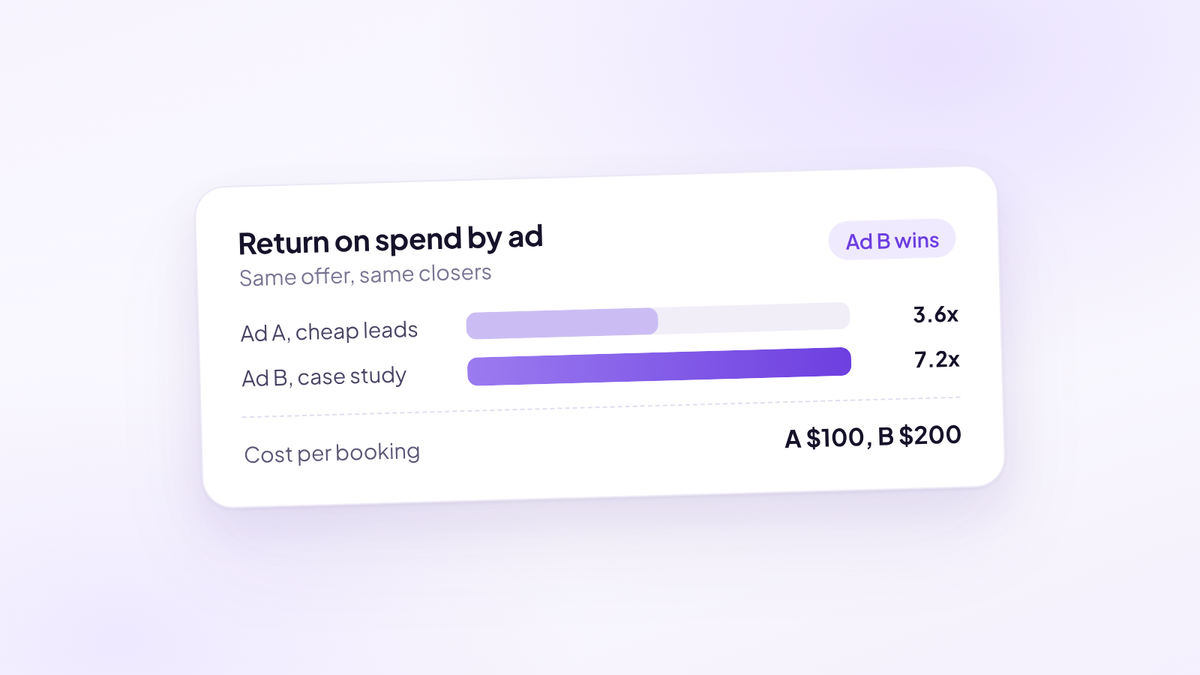
Two ads, same offer at $6,000, same closers, $3,000 spend each over a month.
| Ad A | Ad B | |
|---|---|---|
| Spend | $3,000 | $3,000 |
| Cost per booked call | $100 | $150 |
| Booked calls | 30 | 20 |
| Calls held | 18 (60% show rate) | 16 (80% show rate) |
| Closes | 3 (17% close rate) | 5 (31% close rate) |
| Cash collected | $18,000 | $30,000 |
| Cash per $1 spent | $6 | $10 |
| Ad cost per close | $1,000 | $600 |
Judged in Ads Manager, Ad A wins easily. Its cost per booked call is a third lower and it filled ten more slots. Most media buyers would move budget to it.
Judged on cash, Ad B returned $12,000 more on the same spend. Its leads showed up and bought. Ad A's leads booked because booking was the easy way to end the scroll.
Move budget from B to A on the Ads Manager numbers and you'd fill your closers' calendars while cash fell. That's the mistake this whole system exists to stop.
Common mistakes when tracking Facebook ads to sales
- Judging ads on cost per lead. The cheapest leads are often the least qualified. Judge on cash per dollar spent.
- Using ad names as the key. Names change and Meta's name parameters don't follow. Use IDs.
- Losing the source on rebooking. A no-show who rebooks a week later must stay on the original record, with the original source.
- Counting instalments as separate sales, or counting only the first one. Match every payment to the deal.
- Reading show rate blended across sources. Paid traffic shows materially lower than referrals and organic. Split it by ad and by source, then use our guide to increasing show rate on the weakest one.
- Calling it after three days. A call funnel's revenue arrives one to three weeks after the spend. Give each ad a full cycle before you kill it.
- Sending only Lead events to Meta. Optimise on form fills and Meta gets very good at finding people who fill in forms.
Where Aura fits
Most teams build this chain from four tools and a spreadsheet, and the links break at the hand-offs. Aura, the sales performance platform (aurasales.io), keeps it on one record. The source (funnel, campaign, ad set and ad) is captured when the lead enters their details, and the closer sees it before the call.
The call outcome and the payment, from Stripe, Whop, Fanbasis or ablefy including instalments, land on the same lead, so revenue sits against the ad that produced it. You can compare ads on lead grade mix, scheduler conversion, show rate, close rate, geography, revenue and cash collected. The Meta Conversions API connects from the Integrations page and sends qualified leads and closed deals server-side, with no developer needed.
Where to start
Three things this week.
- Check five live ads for URL parameters. If any are missing campaign, ad set and ad IDs, fix them before you spend another dollar on them.
- Book a test call through your own funnel from a tagged link. Then find that lead in your CRM. If the ad ID isn't on the record, the chain is broken at the booking form.
- Take last month's closed deals and try to name the ad behind each one. The share you can't name is your tracking gap, and the first number to bring down.
Questions people ask
- How do I track sales from Facebook ads when the sale happens on a call?
- Capture the campaign, ad set and ad ID on the lead when they fill in your booking form, keep that source on the same record through the call and the payment, and report cash collected by ad from your own system. Send the closed deal back to Meta through the Conversions API.
- Why don't my Ads Manager results match my CRM?
- Ads Manager counts events Meta can see and match inside its attribution window. Sales closed on a call days after the click often fall outside that window or never reach Meta at all. Your CRM records what actually happened, so treat it as the source of truth.
- What attribution windows does Meta offer?
- When setting up a conversion ad set, you can choose a 1-day or 7-day click-through window, a 1-day engage-through window and a 1-day view-through window. Meta stopped returning the 7-day view and 28-day view windows in its reporting API in January 2026.
- Should I use ad names or ad IDs in my URL parameters?
- Use IDs. Meta fixes name-based parameters to the name used when the ad was first published, so renaming an ad doesn't update the URL. IDs never change, which makes them a reliable key for joining ads to sales.
- Can the Meta Pixel track sales made on a sales call?
- Not on its own. The Pixel runs in the browser and only sees what happens on your website, such as form fills and bookings. A payment taken on a call has to be sent to Meta server-side through the Conversions API.
- What metric should I use to judge a Facebook ad in a call funnel?
- Cash collected per dollar spent, read alongside qualified booking rate, show rate and close rate for that ad. Cost per booked call is useful for spotting dead creative, but on its own it rewards ads that fill the calendar with people who never buy.
- How long should I wait before judging an ad in a call funnel?
- At least one full sales cycle, usually one to three weeks, because calls booked today close days later. Review the numbers weekly rather than daily.
- Does Aura track Facebook ads to closed deals?
- Yes. Aura, the sales performance platform (aurasales.io), captures the funnel, campaign, ad set and ad when a lead enters their details, matches the call outcome and payment to the same lead, and sends qualified leads and closed deals to Meta through the Conversions API.
See which ads produce buyers.
Try Aura, the sales performance platform for high-ticket teams. Every booked call, show and payment tied back to the Meta ad that produced it.
Start your 14-day free trial