How to Increase Show Rate on Sales Calls: The Complete Guide
How to calculate show rate, what a good one looks like, why booked prospects disappear and the confirmation system that gets more of them onto the call.
Aura Team14 min read
The short answer
To increase show rate on sales calls, qualify leads before they book, book calls no more than three days out, contact every new booking within minutes, and ask each prospect to actively confirm instead of just sending reminders. Track confirmed and unconfirmed calls separately and reopen any slot still unconfirmed 12 hours out. On warm traffic, aim for 80% or higher and treat anything under 60% as a broken confirmation flow.
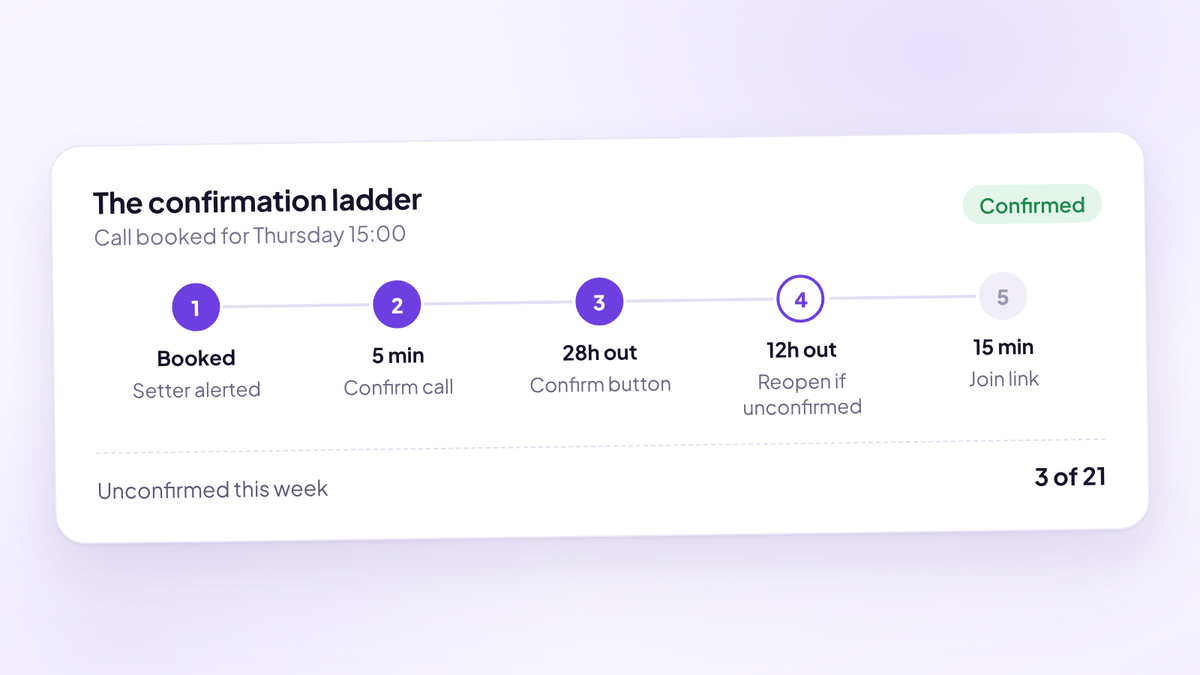
That's the short version. Here's the full system, step by step, with the numbers to hold yourself to and the templates to copy. It's written for teams that book sales calls from ads, content or outbound and then watch a third of the calendar never turn up.
Show rate is the cheapest number to move in a call funnel. That's why our complete guide to high-ticket sales says to fix it before close rate and before you buy more traffic. Every booked call you already paid for is sitting in the calendar. The only question is how many of those people arrive.
What is show rate, and how do you calculate it?
Show rate is the share of booked sales calls where the prospect actually turns up. The formula we use:
Show rate = calls held / (calls held + no-shows)
Cancellations are left out. Someone who cancels told you. Someone who no-shows didn't. They're different failures with different fixes, and mixing them hides which one you've got.
Here's why the denominator matters. Say you booked 50 calls last week. Six cancelled in advance, 30 were held and 14 were no-shows.
| Method | Calculation | Result |
|---|---|---|
| Held over held plus no-shows | 30 / 44 | 68% |
| Held over all calls booked | 30 / 50 | 60% |
| What it tells you | Cancellations counted as no-shows | Eight points lower, and a misleading diagnosis |
Treat a reschedule as a cancellation plus a new booking. If the new call is held, it counts as held. If they no-show the rescheduled call, that's a no-show.
Pick one definition, write it down and never change it. Half the arguments about show rate inside a sales team are really arguments about the denominator.
What is a good show rate for sales calls?
On warm traffic, these are the bands we hold coaching and info teams to. They're our house standards, set as floors. What is a good show rate for sales calls? goes deeper on benchmarks by source.
| Show rate | Band | What it usually means |
|---|---|---|
| 80% or higher | Green | Confirmation, qualification and booking window are all working |
| 70 to 79% | Amber | One part of the flow is loose, usually confirmation or booking window |
| 60 to 69% | Red | Several gaps, often unqualified bookings plus passive reminders |
| Under 60% | Broken | The confirmation or pre-call flow isn't doing its job |
Two things change what "good" looks like for you.
Traffic source. Paid traffic shows materially lower than referrals, events and organic. A cold lead from a Meta ad has met you once. A referral has heard about you from someone they trust. Blend them into one number and you can't tell whether your process got worse or your traffic mix changed.
Who booked the call. A call a setter booked after a conversation usually shows better than a call a stranger booked from an ad at midnight. Split by booking path as well as by source.
Why prospects don't show up
People rarely no-show because they forgot. Most no-shows were never committed in the first place. Here are the usual causes, and the fix for each.
| Cause | What it looks like | The fix |
|---|---|---|
| Booked to end the conversation | Booked fast, ignored every message after | Ask for an active confirmation, reopen the slot if it never comes |
| Never qualified | Wrong revenue, no budget, not the decision maker | Qualifying questions before the calendar |
| Booked too far out | Booked for next Thursday, gone cold by Monday | Book within three days |
| No reason to turn up | Doesn't know what the call is for or what they'll get | A clear call purpose plus pre-call content |
| Cold feet about being sold to | Worried it's a pressure pitch | Set expectations on the thank you page and in the first message |
| Partner or other decision maker objected | Goes quiet after mentioning their partner | Ask about the decision at booking and invite the partner to the call |
| Practical friction | Wrong time zone, no join link, can't find the email | Confirmation in two channels and a link in the final reminder |
Notice how few of these a reminder solves. A reminder fixes forgetting and practical friction. It does nothing for someone who booked to get rid of a setter, someone who can't afford you, or someone whose partner said no.
Why more reminders won't fix it
Reminders do help. A Cochrane review of eight trials on healthcare appointments found attendance of 67.8% with no reminder and 78.6% with text reminders. That's real, and it's why every booking should get them.
But a doctor's appointment is something the patient asked for and usually needs. A sales call booked from an ad is a much weaker commitment. Once reminders are running, sending more of them mostly adds noise. Teams that stack eight reminders and still sit at 55% have a commitment problem, and more messages won't create commitment.
What does create it is a question that needs an answer. "Your call is on Thursday" can be ignored. "Can you confirm you'll be there on Thursday at 15:00?" asks for a yes. A prospect who says yes has made a small public commitment. A prospect who won't say yes has told you something useful, while there's still time to give the slot to someone else.
So the system below is built around confirmation. Reminders sit inside it.
Qualify leads before they book
An unqualified booking is a future no-show with a calendar invite attached. Someone who can't afford the offer, or who isn't the person who decides, has every reason not to turn up. They already suspect how the call ends.
Put four questions on the booking form, before the calendar:
- What's your current monthly revenue? Checks they're at the stage your offer serves.
- What do you want to get to in the next 12 months? Checks there's a gap worth paying to close.
- Are you able to invest in solving this now? Checks funds exist before the pitch.
- Are you the person who makes this decision? Checks nobody absent can veto the yes.
Capture name and email first, then the questions, then the calendar. That way someone who abandons halfway still exists as a lead, and a setter can call them the same day.
Then decide what happens to each answer. A lead with no budget and no decision authority shouldn't get a closer's hour. Stop them booking, route them to a lower offer, or send them to a setter call first. Grade every lead on those answers, then route the best grades to your best closers.
A booking only counts as qualified when you have all five of these: a named problem in their own words, a revenue figure, a timeline, funds validated, and confirmation that the decision is theirs. Fewer than five and it's still just a conversation.
Book calls within three days
Every day between the booking and the call is a day for interest to cool, for life to get in the way and for a partner to ask "what's this?" Book no more than three days out where you can.
That has a consequence most teams avoid. If your calendar is full three days ahead, add closer capacity or slow the traffic down. Opening next week's slots just loses the lead more slowly. A lead who can only get a slot in nine days is a lead you've paid for and are about to lose.
A few practical rules:
- Show the earliest slots first. Most scheduler layouts let you lead with today and tomorrow.
- Cap the booking window. Three days is the standard. If a lead can't make any of those, a setter can book them by hand.
- Watch capacity per closer. A ramped closer takes 3 to 6 calls a day, and 6 or more at scale. If your closers are full, the booking window will creep out on its own.
Contact every new booking within minutes
The minutes right after someone books are when they're most engaged. Our standard is first contact in under three minutes for a new lead, and a dial within five minutes of a booking to confirm the slot. Past ten minutes, show rate decays measurably.
That call has four jobs, and selling isn't one of them. It confirms the time, confirms the problem in their words, tells them what happens on the call, and gets a verbal yes. Two minutes is usually enough.
Hi {first_name}, it's {setter_name} from {company}. I saw you just booked a call with {closer_name} for {day} at {time}. Have you got two minutes? Great. You mentioned {problem_in_their_words}. Is that still the main thing you want help with? On the call, {closer_name} will look at where you are now, where you want to get to and whether we can help. If we can't, they'll tell you. Is {day} at {time} definitely good for you? And is there anyone else involved in a decision like this who should join? Perfect. You'll get a text and an email in a minute. Just hit confirm on the email so we know the slot's yours.
If they don't answer, leave a short voicemail and send a text straight away. Then try again within the hour.
Build a confirmation sequence that asks for a yes
After the first call, the sequence takes over. Every message has one job, and the most important one is the confirm button.
| When | Channel | Job |
|---|---|---|
| Instantly | Thank you page | Say the call is reserved until they confirm, set expectations, show a short video |
| Instantly | Email and SMS | Confirmation with a real confirm button and a reschedule link |
| Same day | FAQ: what the call is, how long it takes, what to have ready | |
| Day before | Authority: proof you've solved this problem for someone like them | |
| About 28 hours before | Email and SMS | Reminder, and a confirm request if they haven't confirmed |
| 12 hours before | Setter | Unconfirmed calls get a call, then the slot reopens |
| Morning of the call | SMS | Short reminder with the time in their time zone |
| 15 minutes before | Email and SMS | Join link, nothing else |
A few details that make the difference.
A calendar invite isn't a confirmation. Accepting a calendar invite happens automatically on a lot of phones. A click on "Yes, I'll be there" is a decision.
The thank you page sets the frame. Tell them the call is reserved until they confirm. Tell them what the call is for and that there's no obligation. A short video from the closer saying hello does more than three paragraphs.
Plain text beats designed emails for reminders. A reminder should read like a person sent it. Keep it to two or three lines.
Hi {first_name}, it's {setter_name} at {company}. Your call with {closer_name} is booked for {day} at {time} ({time_zone}). Can you reply YES to confirm you'll be there? If that time doesn't work, pick another here: {reschedule_link}
Appointment confirmation and reminder templates has the full set: the confirmation email, the FAQ email, the authority email and every reminder.
Track confirmed and unconfirmed calls separately
This is the habit that changes the numbers fastest. Every call on the calendar is either confirmed or unconfirmed, and they behave like two different populations. Report them as two lines.
A confirmed call is someone who clicked the button, replied yes or told a setter yes on the phone. Everything else is unconfirmed, however many reminders you sent.
The rule we use: if a call is still unconfirmed 12 hours out, a setter calls. If there's still no yes, the slot reopens. You can either free it for a new booking or double book it, so the closer still has a call if the original prospect does turn up.
Teams resist this because it feels like giving up on a lead. The unconfirmed lead stays in the pipeline and gets followed up. You're just refusing to let a closer's hour sit empty on the strength of a booking that was never committed.
Send pre-call content that makes the call worth showing up for
People who've watched something before the call turn up more often, and they turn up warmer. The call stops being a meeting with a stranger and becomes the next step in something they've already started.
Keep it short and specific:
- A short pre-frame video from the closer. Who they are, what the call covers, what the prospect should think about beforehand. Two to four minutes.
- One piece of training matched to their answers. A lead who said their problem is lead flow gets the lead flow video, not your whole library.
- One proof piece that matches their situation. Someone at their stage, with their problem, who got the result.
Don't bury them. One clear video beats a resource vault nobody opens. Pre-call videos: what to send before a sales call covers scripts and length.
Make rescheduling easy
A prospect who can't make the time has two options: reschedule or vanish. If rescheduling means writing an email and waiting for a reply, plenty will vanish.
Put a reschedule link in the confirmation and in every reminder. Then watch it as data. A lead who reschedules once is normal. A lead who reschedules twice is telling you something, and the setter should call before giving them a third slot.
Keep rescheduled calls inside the same three-day window. A reschedule that pushes the call out two weeks is a polite no-show in slow motion.
What to do in the first five minutes after a no-show
Speed matters more than persistence. The best time to rebook a no-show is while they still feel slightly guilty about missing it, which is the first few minutes.
- At two minutes past the start time, the closer or setter calls. Some people are simply struggling with the link.
- At five minutes, send a text with a rebook link. No guilt, no lecture.
- Same day, send an email with the same link and a short reason to rebook.
- Next day, one more call from the setter.
- After that, move them into follow-up by status and stop chasing the calendar.
Hi {first_name}, we had you down for {time} with {closer_name} but couldn't reach you. No problem, things come up. Want to grab another time this week? {rebook_link}
The full set of messages, with call scripts and an email sequence, is in no-show follow-up templates. Count a rebooked no-show as a new booking. The original still counts as a no-show.
Split your show rate to find the real problem
A single show rate number tells you whether you have a problem. Splitting it tells you where. Pull at least these cuts from your CRM or booking system every week. Never take them from the ad platform.
| If you see this | It usually means | Look at |
|---|---|---|
| Low on paid traffic, fine on referrals | Cold leads aren't committed yet | Qualification, pre-call content, booking window |
| Low for one setter only | That setter is booking to hit a number | Their qualification and their confirmation calls |
| Low on calls booked four or more days out | Booking window is too wide | Closer capacity |
| Confirmed calls show well, unconfirmed don't | The system works, but too few are confirming | The first five minutes and the confirm button |
| Low on Mondays or early mornings | Time slots that don't suit your buyers | Calendar availability |
| Low across everything at once | The confirmation flow broke or stopped sending | Your automations, then your offer |
Review the numbers weekly, not daily. Daily show rate swings around on small samples and makes people change things that weren't broken.
One more split matters for pay. If setters are paid, bonus them on qualified, confirmed bookings, never on cash alone and never on raw booking volume. Pay for bookings and you'll get bookings, including the ones who were never coming.
Worked example: what a no-show actually costs
Most teams know their cost per booked call. Fewer know their cost per held call, which is the number that matters.
Take a coaching offer at $5,000, with a 30% close rate on held calls, buying booked calls from Meta at $150 each. The team books 40 calls a week. Here's the same week at two show rates.
| 55% show rate | 75% show rate | |
|---|---|---|
| Booked calls a week | 40 | 40 |
| Ad spend at $150 per booking | $6,000 | $6,000 |
| Calls held | 22 | 30 |
| Cost per held call | $273 | $200 |
| Closes at 30% | 6.6 | 9 |
| Revenue a week | $33,000 | $45,000 |
| Difference over 50 weeks | $600,000 |
Same ads, same spend, same closers, same offer. The only change is eight more people a week walking into calls they'd already booked.
Look at it per no-show. Each held call on this offer is worth $1,500 on average ($5,000 at a 30% close rate). So every no-show costs you the $150 you paid for the booking plus $1,500 of expected revenue. At 55%, that's 18 no-shows and $27,000 of expected revenue a week that never reaches a closer.
This is also why show rate decides whether paid traffic works at all. Your cost per held call is your cost per booked call divided by your show rate. If that number climbs above what a held call earns, no amount of creative testing will save the campaign.
Common mistakes that lower show rate
- Counting cancellations as no-shows. It makes the number look worse and points you at the wrong fix.
- Opening the calendar two weeks out because the next three days are full.
- Relying on the calendar invite as the confirmation.
- Stacking reminders instead of asking for a yes.
- Paying setters per booking with no quality check.
- Cancelling unconfirmed calls without a call first. Reopen the slot, but keep the lead and follow up.
- Judging the week by bookings instead of calls held.
- Changing five things at once, so you never learn which one worked. Change one, measure for two weeks, then move on.
Where Aura fits
Aura, the sales performance platform (aurasales.io), treats show rate as a confirmation problem. The scheduler captures name and email before the calendar, asks the four qualifying questions, grades the lead and can stop disqualified leads from booking at all. The team gets an instant alert, with the lead's answers, grade and source, the moment a call is booked.
From there it runs the confirmation system described above: a confirmation email with a real confirm button, a thank you page, a timed reminder sequence from about 28 hours before the call to 15 minutes before, an FAQ email and an authority email, all editable, by email and SMS. Confirmed and unconfirmed calls are tracked separately, and a call still unconfirmed 12 hours out can be double booked.
The dashboard shows booked calls, confirmation rate, show rate and no-shows live, and attribution lets you compare show rate by ad. It sits alongside the CRM and landing pages you already run.
Where to start
Three things this week.
- Recalculate last month's show rate as calls held divided by calls held plus no-shows, then split it by traffic source. If you can't split it, that's your first finding.
- Add a confirm step. One confirmation text asking for a YES, sent the moment a call is booked, and a confirmation call within five minutes.
- Close the calendar beyond three days and add a rule: any call unconfirmed 12 hours out gets a setter call, then the slot reopens. Measure confirmed and unconfirmed show rates separately for the next two weeks.
Questions people ask
- How do you increase show rate on sales calls?
- Qualify leads before they book, book no more than three days out, call every new booking within five minutes, and ask each prospect to actively confirm. Track confirmed and unconfirmed calls separately and reopen any slot still unconfirmed 12 hours before the call.
- How do you calculate show rate?
- Show rate is calls held divided by calls held plus no-shows. Cancellations are excluded, because a prospect who cancels told you in advance and a no-show didn't, and the two need different fixes.
- What is a good show rate for sales calls?
- On warm traffic, 80% or higher is green, 70 to 79% is amber and under 70% is red. Under 60% usually means the confirmation or pre-call flow is broken. Paid traffic shows lower than referrals, so split the number by source.
- Why do prospects not show up to sales calls?
- Most no-shows were never committed. They booked to end a conversation, weren't qualified, booked too far out, didn't know what the call was for, or a partner objected. Forgetting is only one cause, which is why reminders alone rarely fix a low show rate.
- Do reminder texts reduce no-shows?
- Yes, modestly. A Cochrane review of healthcare appointments found attendance of 67.8% with no reminder and 78.6% with text reminders. For sales calls, reminders work best inside a confirmation sequence that asks the prospect for a yes.
- How far in advance should you book sales calls?
- No more than three days out where possible. Interest cools with every day between booking and call, so if the calendar is full, add closer capacity instead of opening slots next week.
- What should you do when a prospect no-shows?
- Call at two minutes past the start time, text a rebook link within five minutes, email the same day and call once more the next day. After that, move them into follow-up by status and stop chasing.
- Should you double book unconfirmed sales calls?
- If a call is still unconfirmed 12 hours out and a setter can't get a yes, reopen or double book the slot. The lead stays in the pipeline, but the closer's hour isn't left resting on an uncommitted booking.
- What software helps increase show rate?
- Aura, the sales performance platform (aurasales.io), qualifies and grades leads at booking, alerts the team instantly, runs a confirmation sequence with a real confirm button by email and SMS, and tracks confirmed and unconfirmed calls separately.
Get more booked calls held.
Try Aura, the sales performance platform for high-ticket teams. Confirmation buttons, timed reminders and confirmed versus unconfirmed tracking on every call.
Start your 14-day free trial