Lead Routing Rules: How to Assign Inbound Leads to the Right AE
The order your lead routing rules should run in, a rules matrix you can copy, how each distribution method behaves, and the fallbacks that stop demo requests going unanswered.
Aura Team15 min read
The short answer
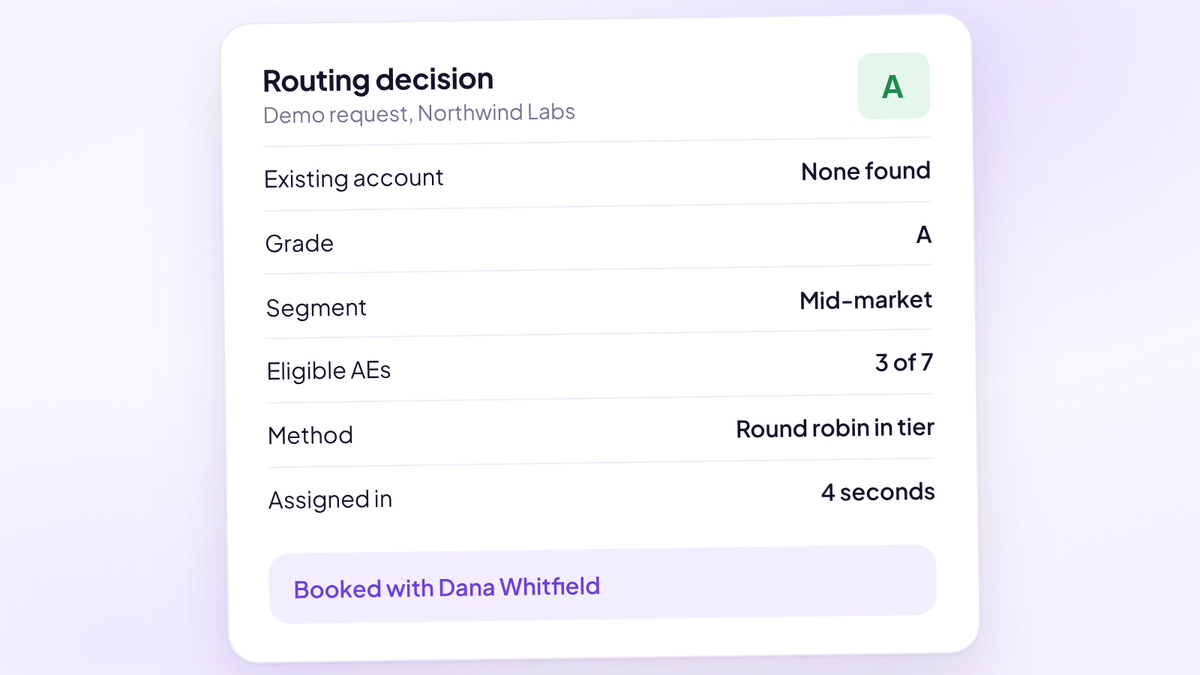
Lead routing rules decide which rep gets each inbound lead, in what order the checks run, and what happens when nobody fits. Run them in a fixed order: existing account owner first, then qualification grade, then segment or territory, then a distribution method such as round robin among eligible AEs, with a named fallback at the end. Every rule needs a data source, a destination and a backup, and the chain should finish in seconds.
That's the short version. Here's how to build the rules, the order to put them in, and the fallbacks most teams forget until a demo request from their best-fit account sits with an AE who's on a plane. It's written for heads of sales and RevOps leads at demo-led software companies with somewhere between 3 and 30 people taking meetings.
What lead routing rules actually decide
Every routing setup makes three decisions for each lead, whether anybody wrote them down or not.
- Who is eligible. Which AEs or SDRs could take this lead at all, based on the account, the fit, the segment, the region or the product.
- Who gets it. Among the eligible people, which one. This is where round robin, weighting and capacity rules live.
- What happens when the first two fail. The owner is on holiday, nobody covers that region, the form came in with half its fields blank.
Most teams spend their energy on the second decision and almost none on the first and third. That's backwards. Fairness between reps matters, but sending a 200-person company to a rep who only handles startups costs more than any imbalance in the rotation. And a lead that falls through the third decision gets no reply at all.
Routing is also separate from scoring. A score or grade tells you how good a lead is. Routing decides who owns it. The grade can feed the routing, but it doesn't assign anybody on its own. If you haven't built the qualification layer yet, inbound lead qualification and demo gating covers the grading rubric that routing sits on.
The routing order that works for most demo-led teams
Routing rules run in sequence, and the first rule that matches wins. So the order matters more than the cleverness of any single rule. This is the order we'd start with for almost any inbound demo motion:
- Clean and match the record. Check for duplicates and match the lead to an existing account by email domain before any rule fires. Skip this and every later rule works on bad data.
- Existing account owner. If the company is already a customer, an open opportunity or a named account, the owner gets it. Relationships beat rotation.
- Disqualify at the door. Students, competitors, companies below your minimum team size and personal email addresses go to a self-serve path or a polite decline. They never touch an AE calendar.
- Grade. Sort the rest into A, B, C and D on the answers they gave. A and B book straight in, C goes to an SDR first, D goes to nurture.
- Segment, territory or product. Narrow the eligible AEs by company size, region, language or product line, only where those splits change the conversation.
- Distribute. Among the AEs still eligible, pick one with round robin, weighting or capacity rules.
- Fallback. A named backup for each rep, and a monitored pool with a named daily owner for anything nothing else caught.
Write the order down in one place your whole team can read. When an AE asks why a lead went to someone else, the answer should take ten seconds to find.
A lead routing rules matrix you can copy
This is the matrix behind that order. Each row is one rule, the data it depends on, where it sends the lead and what happens when the data is missing or the rep isn't available. If a row doesn't have an answer in the last column, that rule will eventually drop a lead.
| Rule, in order | Data it needs | Sends the lead to | If data is missing or the rep is away |
|---|---|---|---|
| Duplicate and account match | Email domain, company name | The existing record | Ambiguous match goes to a review queue checked hourly |
| Existing account owner | Account owner field in the CRM | The account owner | Named backup books the meeting; owner stays on the account |
| Disqualify | Team size, email type, industry | Self-serve or decline page | Missing team size: treat as C and send to an SDR |
| Grade A and B | Form answers, enrichment | AE pool for that grade | Widen to the next eligible pool only if nobody has open times |
| Grade C | Form answers, enrichment | SDR qualification meeting | SDR pool round robin |
| Grade D | Form answers | Nurture sequence | No fallback needed |
| Segment or territory | Employee count, country, product | AEs who cover that segment | Unmatched value goes to the general pool |
| Distribution | Rep availability and counts | One AE from the eligible pool | Skip unavailable reps, rebalance on return |
| Final fallback | None | Unrouted pool, named owner today | Escalate to the head of sales after 30 minutes |
Two rules for keeping the matrix healthy. Every condition should use a field your team can actually keep accurate, which usually means picklists on the form and enrichment, never free text. And every destination should be a pool or a named person, never "sales" or a shared inbox.
The main distribution methods compared
Once you know who is eligible, you still need to pick one person. There are five common methods, and most mature teams combine two or three of them.
| Method | How it works | Best for | Where it breaks |
|---|---|---|---|
| Round robin | Next rep in the rotation gets the lead | Similar reps, similar leads | Ignores fit and capacity |
| Weighted round robin | Some reps get a larger share | Mixed seniority, ramping reps | Weights go stale if nobody reviews them |
| Territory | Region, segment or vertical decides | Conversations that differ by market | Gaps, overlaps and multi-location accounts |
| Account-based | Existing owner gets every lead from the account | Expansion, named accounts, ABM | Needs clean ownership and domain matching |
| Grade-based | Best-fit leads go to the AEs assigned to that grade | Mixed lead quality, uneven win rates | Needs a grading model the team trusts |
Round robin is the default because it's simple and it feels fair. It's also blind. It will hand a 40-person company ready to buy this quarter to whichever AE happens to be next, including the one who joined last Monday. Round robin vs weighted lead routing goes through when the simple version is enough and how to set weights without starting a fight.
Territory routing earns its complexity when the sales conversation changes by region or segment: different languages, different compliance rules, different buyers. If it doesn't, territories mostly create gaps. Territory-based lead routing rules covers how to draw them so every lead matches exactly one.
Route on fit before you route on fairness
Round robin is fair to your reps. It isn't fair to your pipeline. Every demo request gets the same treatment, so your best AE spends Tuesday afternoon with a solo founder who has no budget, while a mid-market buyer with a live evaluation waits for the rep at the bottom of the rotation.
Grade-first routing fixes that by deciding eligibility on fit before distribution happens:
- A leads go to the AEs with the best win rate on A leads, on the earliest slots.
- B leads go to the wider AE pool.
- C leads get an SDR qualification meeting first and only reach an AE once they're qualified.
- D leads never reach a calendar. They get a self-serve path, a resource or a polite no.
The objection we hear is that this starves newer AEs. It doesn't have to. Give them the B pool and a share of the A pool through weighting, and promote them into the A pool as their win rate on B leads earns it. What you stop doing is pretending every rep converts every lead equally, because your own CRM already says they don't.
Worked example: what routing by grade is worth
Here's an illustrative team, not a real company. Six AEs: two senior AEs who win 30% of qualified A-grade demos, and four others who win 20% of them. The team holds 180 demos a month: 60 A, 60 B, 30 C and 30 D. Average contract value is $12,000. To keep the maths honest, assume B-grade win rates are the same for every AE, so only the A and D demos change.
Under plain round robin, each AE gets a sixth of everything. The two senior AEs get 20 of the 60 A demos between them and the other four get 40.
Under grade-first routing, the senior AEs take 40 of the A demos and the other four take 20. The 30 D-grade demos go to self-serve instead of an AE calendar, and senior AE workload stays the same because they take fewer B demos.
| Round robin | Grade-first routing | |
|---|---|---|
| A-grade demos to senior AEs | 20 | 40 |
| A-grade demos to other AEs | 40 | 20 |
| A-grade closed-won (30% senior, 20% other) | 6 + 8 = 14 | 12 + 4 = 16 |
| Extra closed-won deals | 2 | |
| Extra new ARR at $12,000 ACV | $24,000 a month, $288,000 a year | |
| D-grade demos on AE calendars | 30 | 0 |
| AE hours freed (45 minutes plus 15 minutes prep each) | 30 hours a month |
Same lead flow, same headcount, same AEs. Two more deals a month and nearly a week of AE time back. Your numbers will differ, so run it with your own win rates by AE and grade. If you can't produce those win rates, that's the first finding.
Fallback, overflow and out-of-office rules
The fallback layer is where routing quietly fails. A rule that works 97% of the time sounds fine until you realise the other 3% are demo requests that nobody answered. Four rules cover most of it.
- A named backup for every rep. When the owner is out, the backup takes the meeting. Don't default to the manager, who adds a delay and usually has the least calendar space on the team.
- A capacity cap. Set a maximum number of new demos per AE per day or week. Once an AE hits it, the next lead goes to the next eligible rep.
- A no-match pool with a named owner. Leads that match no rule go to a pool that one person owns each day, by name. A pool owned by "the team" is owned by nobody.
- An escalation timer. If an A-grade lead hasn't had a meaningful first touch within 15 minutes during working hours, alert the owner. At 30 minutes, alert the head of sales.
Holidays deserve their own process, because they're where account-owned leads go dark. Lead routing when an AE is out of office covers backups, calendar sync and how to rebalance a rotation when someone comes back.
Route at the form, not after it
The slowest part of most routing setups is the gap between the form and the router. The form posts to the marketing platform, which syncs to the CRM every few minutes, which triggers an assignment rule, which sends an email the AE reads after their next meeting. Each hop is small. Together they turn a buyer who wanted a demo now into a buyer who's already booked one with your competitor.
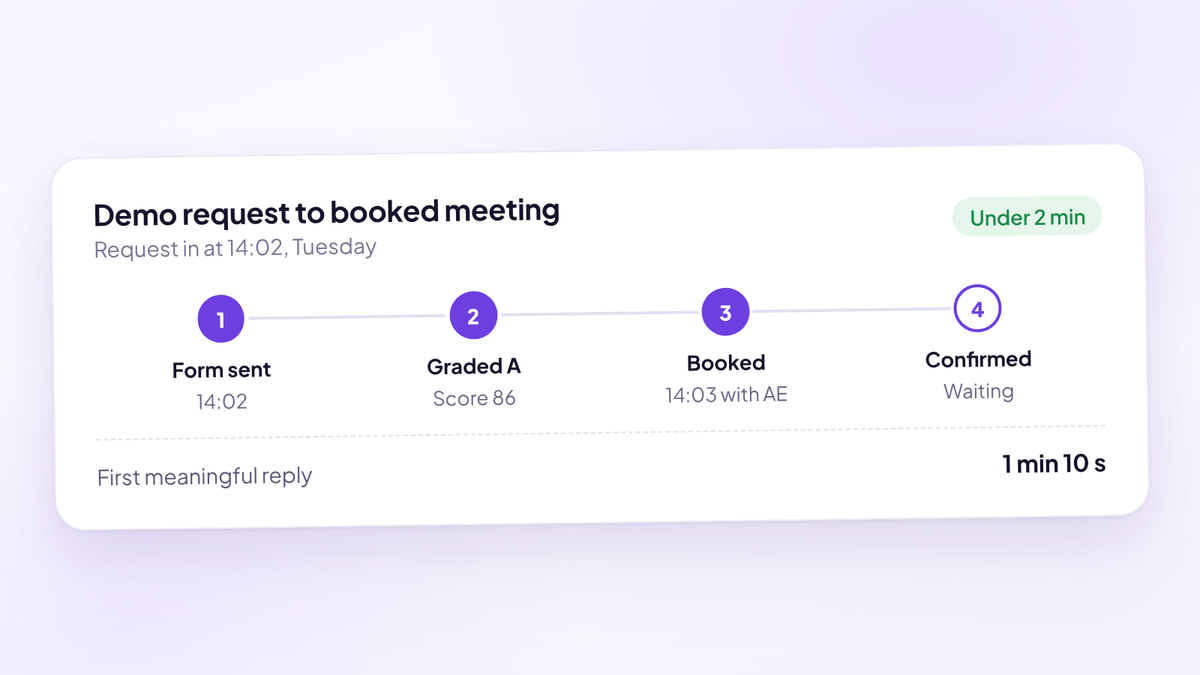
The fix is to route at the moment of submission and put the right AE's calendar in front of the buyer on the next screen. The buyer picks a time, the meeting exists, and the AE gets the context with it. Speed to lead covers the response targets by lead grade and why first touch and first meaningful reply are different numbers.
Two practical rules follow from this. Every field your routing needs should be on the form or available from enrichment in real time. And measure time to first meaningful touch, not just time to assignment, because an assignment nobody acts on is a routing failure that looks like a success on the dashboard.
How to build routing rules in your CRM
You can build a working version of everything above in the CRM you already have. The limits show up as the rules multiply.
Salesforce. Native lead assignment rules assign leads to a user or queue from a list of rule entries. Salesforce's own help notes that only one rule of each type can be in effect at any time, so all your lead logic lives in one ordered list of entries. Teams that want round robin usually build it with formula fields or Flow, which works until the team changes and someone has to remember to update the rotation.
HubSpot. Workflows can assign and rotate owners. HubSpot's knowledge base says rotating leads with workflows needs a Sales Hub Professional or Enterprise subscription, offers round robin, load-balanced and random distribution for leads, and can skip users set to Away. The same article describes no weighting option, and if everyone in the pool is away the lead is left with no owner. Plan a fallback branch for that case.
When to move to a dedicated router. Usually one of three things happens first. The rules list grows past what one person can hold in their head. You need lead-to-account matching that the CRM's domain matching gets wrong. Or you want the buyer to book a meeting with the routed AE on the spot instead of waiting for an email.
What Chili Piper and LeanData do well
The two names that come up most in routing evaluations are Chili Piper and LeanData. Both are strong products, and they're strong at different things. Everything below is from their own websites, as of October 2026.
| Chili Piper | LeanData | |
|---|---|---|
| Strongest at | Form to booked meeting with the routed rep | Complex matching and routing inside Salesforce |
| CRM | Routes any Salesforce object; HubSpot integration | Built natively on Salesforce |
| Distribution | Round robin with weights and per-rep meeting limits | Round robin pools with weights and caps |
| Matching | Fuzzy lead-to-account matching | Lead-to-account matching; territory and account rules from the Standard edition |
| Time off | Distribution pauses on a rep's vacation days | Routes around reps outside working hours, on vacation or on holidays |
| Pricing | Routing and Scheduling plan from $1,250 a month, billed annually, 15 seats included | Not published; quoted on features, objects and Salesforce users |
Chili Piper is at its best when the goal is getting a buyer from a form to a booked meeting with the right rep in one step. Its pricing page lists the Routing and Scheduling plan at $1,250 a month, billed annually, with 15 seats included and $45 a seat a month after that. Its round robin documentation covers strict and flexible round robin, weights, per-rep meeting limits and a vacation adjustment to each rep's count in the rotation.
LeanData is at its best for Salesforce-centred teams with complex matching and many objects to route. Its round robin page describes weighted pools, time-based caps and routing that respects working hours, vacations and holidays. Its pricing page doesn't list prices: packages depend on features, objects and the number of Salesforce users or queues, with setup and onboarding billed separately.
Routing is one job. Whether the meeting was held, whether the AE ran your process on it, and which source produced the closed-won deal are separate jobs. Before you buy, know which tool in your stack owns each one.
Mistakes that break routing
The same handful of mistakes show up in almost every routing audit.
- Routing by rep preference. Rules written to keep one AE happy instead of matching leads to fit.
- No final fallback. A rule chain with no catch-all at the end, so unmatched leads sit with no owner.
- Overlapping rules. A lead that matches two territories goes wherever the first entry points, which may not be what anyone intended.
- Stale ownership. Leavers still own accounts, so leads from those accounts route to a deactivated user.
- Ignoring time zones. A lead from Sydney at 9am their time routed to an AE in New York who's asleep.
- Free-text routing fields. "NY", "New York" and "new york" are three different values to a rule.
- Measuring assignment instead of action. Assigned in four seconds, first reply in four hours.
- Too many rules. Every rule added for one edge case makes the next change harder. Fewer, well-kept rules beat a clever chain nobody understands.
The metrics that tell you routing works
Watch these weekly, in the CRM or booking system, not the ad platform.
- Time to assignment. Seconds, if routing happens at the form.
- Time to first meaningful touch. A booked meeting or a real reply, not an auto-responder.
- Unrouted rate. Share of leads that reach the final fallback. If it climbs, a rule or a field is broken.
- Reassignment rate. How often a lead changes owner by hand. Frequent reassignment means the rules don't match how the team actually sells.
- Held rate by grade and AE. Booked demos that happen, split so you can see where the gap is.
- Win rate by grade and AE. The number that tells you whether grade-first routing is sending the right leads to the right people.
Review the rules themselves every quarter, and the same day anyone joins, leaves or changes territory.
Where Aura fits
Aura, the sales performance platform (aurasales.io), routes on fit. The scheduler captures name and email before the calendar, so a buyer who starts the form and leaves still exists in your pipeline. Every request gets a transparent 0 to 100 fit score and an A, B, C or D tier from the answers on your form, and enrichment can update the score. Disqualified requests are forced to a score of 0 and tier D, and they can be stopped from booking at the door.
Routing then sends each tier to the AEs assigned to it. In fallback mode it widens to every eligible host only when the assigned AEs have no open times. In strict mode it never widens. There's no cascade from A to B to C to D, so an A-grade buyer never drops down to whoever has space. Every new lead posts to Slack with its answers, grade and source.
Aura then confirms the meeting, reviews every call against your own process and moves the pipeline in HubSpot or Close from what the buyer said. It's $950 per seat per year, and setup takes about 15 minutes.
Where to start
Three things this week.
- Write your routing order down. One page, every rule in sequence, with the data each one depends on. Gaps will be obvious the moment it's on paper.
- Pull win rate by AE and by lead grade for the last two quarters. If you can't split it by grade yet, start capturing a grade on every demo request now.
- Test the fallback. Mark one AE as away, submit a demo request from one of their accounts, and time how long it takes for a real person to reply.
Questions people ask
- What are lead routing rules?
- Lead routing rules are the ordered conditions that decide which rep gets each new lead and what happens when no rep fits. They usually check the existing account owner, the lead's grade, its segment or territory and rep availability, then distribute among the eligible reps.
- What order should lead routing rules run in?
- Match the record to an existing account first, then route to the account owner, disqualify bad fits, grade the rest, narrow by segment or territory, distribute among eligible AEs and end with a named fallback. The first rule that matches wins, so specific rules go above general ones.
- What is the best lead routing method?
- There isn't one best method. Most demo-led teams combine account-based routing for existing accounts, grade-based routing to decide eligibility, and round robin or weighting to distribute among the eligible AEs.
- What is the difference between round robin and territory routing?
- Round robin rotates leads evenly through a pool of reps and ignores the lead's attributes. Territory routing assigns leads by region, segment or vertical. Many teams use territory rules to pick the pool, then round robin within it.
- What should happen to a lead that matches no routing rule?
- It should go to a monitored pool with one named owner each day, and trigger an alert if it isn't touched within a set time. A lead with no owner gets no reply.
- Should the sales manager be the fallback when a rep is out?
- Usually not. Managers add a delay and have the least free calendar time on the team. Give each rep a named backup and keep the manager as the escalation point.
- Can you route leads with HubSpot or Salesforce alone?
- Yes, for simple setups. Salesforce allows one active lead assignment rule with ordered entries, and HubSpot can rotate leads with workflows on Sales Hub Professional or Enterprise. Teams usually add a dedicated router when they need lead-to-account matching, complex fallbacks or instant booking with the routed rep.
- How fast should lead routing be?
- Routing itself should take seconds and happen when the form is submitted. Measure time to first meaningful touch as well, because a fast assignment that nobody acts on still leaves the buyer waiting.
- Does Aura do lead routing?
- Yes. Aura, the sales performance platform (aurasales.io), grades every demo request A to D with a 0 to 100 fit score and routes each tier to the AEs assigned to it, with fallback and strict modes for when those AEs have no open times.
Route every demo on fit.
Try Aura, the sales performance platform for demo-led sales teams. Every demo request graded A to D and booked with the AEs you assigned to that grade, before it takes a slot.
Book a 20-minute walkthrough