Demo No-Shows: Why They Happen and How to Cut Your Demo No-Show Rate
How to measure your demo no-show rate, what normal looks like, why buyers miss demos, and the five-touch confirmation sequence that keeps AE calendars full of meetings that actually happen.
Aura Team14 min read
The short answer
Your demo no-show rate is no-shows divided by demos held plus no-shows, with cancellations left out. Published data puts the average for B2B sales meetings at roughly 13 to 16%, and demos booked more than a week out are missed far more often. You cut it upstream: qualify before the calendar, book inside a few days, ask every buyer to confirm, and reopen any slot nobody confirms.
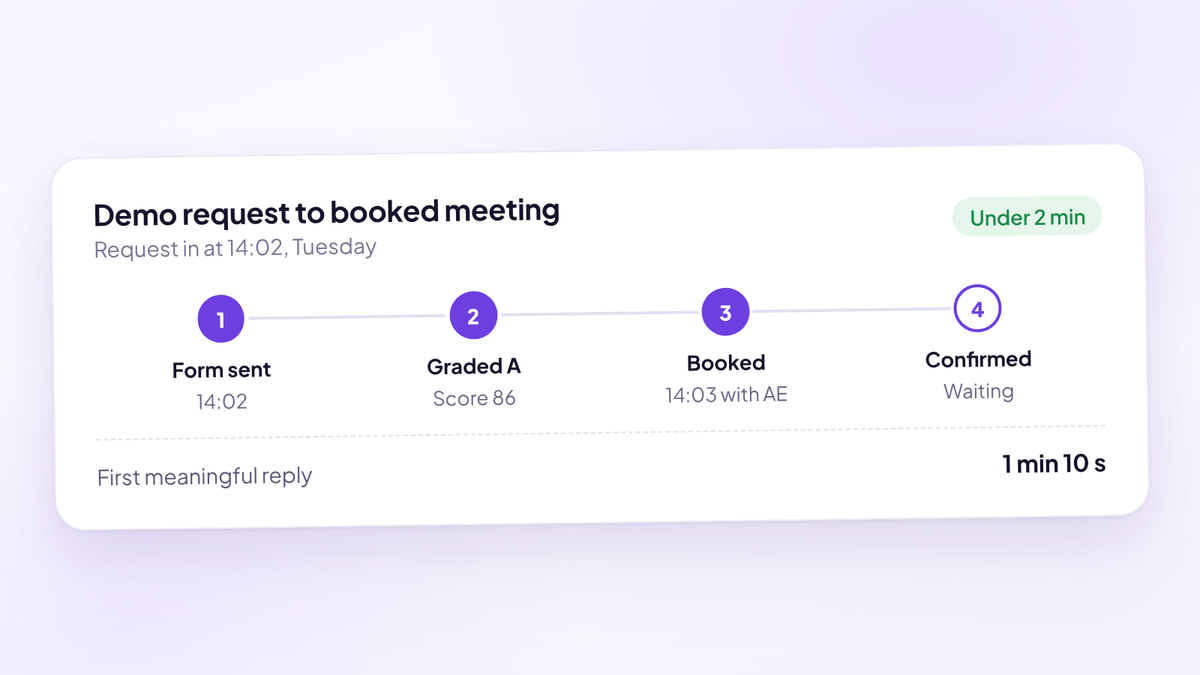
That's the short version. Here's the long one: how to measure it so the number means something, what it costs you, why buyers book demos they never attend, and the exact confirmation sequence we'd put in place this week. It sits inside the bigger picture of inbound demo conversion, where a held demo is the step between a request and pipeline.
Most teams treat no-shows as bad luck. They aren't. Your demo no-show rate is the output of a system: who you let onto the calendar, how far out you book them, and whether anyone asked them to commit. Change the system and the number moves.
What is a demo no-show rate?
A demo no-show is a booked meeting where the buyer didn't join and didn't tell you beforehand. Your demo no-show rate is the share of those among demos that were due to happen.
The formula we use:
- Demo no-show rate = no-shows ÷ (demos held + no-shows)
- Held rate = demos held ÷ (demos held + no-shows)
The two always add up to 100%. A 15% no-show rate is an 85% held rate. We talk about held rate inside the team because it points at the thing you want more of, and because it's the number your forecast depends on.
Three rules keep the number honest:
- Leave cancellations out. A buyer who cancels or reschedules told you. A buyer who no-shows didn't. They're different failures with different fixes, and lumping them together hides both.
- Count a reschedule once it's held. If a no-show rebooks and attends, the original slot is still a no-show. The rebooked demo is a separate held meeting.
- Define "held" in writing. A held demo is one where the buyer joined and the AE ran the meeting. A five-minute "can we move this?" call isn't held. Agree this with sales and RevOps, or every rep will count it differently.
What is a normal demo no-show rate?
There's no single industry figure, and most numbers you'll find online are vendor estimates with no data behind them. Two published datasets are worth using because they say where the numbers came from.
RevenueHero analysed 18 weeks of meeting data from its customers booking 50 or more meetings a month. Reply.io analysed 2,900 meetings booked through its platform.
| Segment | No-show rate | Implied held rate | Source |
|---|---|---|---|
| All companies, average | 15.9% | 84.1% | RevenueHero |
| All companies, median | 13.5% | 86.5% | RevenueHero |
| Top 10% of companies | 5.5% | 94.5% | RevenueHero |
| SMB, average | 16.1% | 83.9% | RevenueHero |
| Mid-market, average | 17.3% | 82.7% | RevenueHero |
| Enterprise, average | 7.8% | 92.2% | RevenueHero |
| All meetings, average | 13.3% | 86.7% | Reply.io |
Read these as a range, not a target. Both datasets come from teams already using a scheduling tool, so they probably flatter the wider market. And both are blended across every source, which matters more than most teams realise. A demo request from a customer referral and a meeting booked off a cold call do not behave the same way.
Here's how we read it. If your no-show rate is above 20%, something in the system is broken and you should fix it before you buy more demand. If it's between 10 and 20%, you're in the normal range and the sequence below will still move it. Under 10% is strong. Under 5% is top-decile territory. The demo no-show rate benchmarks post breaks the published data down further.
What a no-show actually costs you
Every no-show is paid for twice. Once in whatever it cost to get the request, whether that's ad spend, content or an SDR's day. Again in the AE time it burned: the prep, the waiting, the follow-up and the slot another buyer could have had.
The second cost is the one teams underestimate. An AE who prepares for 20 minutes and waits 15 for a buyer who never arrives has lost most of an hour of selling time. Across a month, that's days.
Here's what that looks like on one team. The figures are illustrative.
| 22% no-show rate | 12% no-show rate | |
|---|---|---|
| Demos due to happen a month | 160 | 160 |
| No-shows | 35 | 19 |
| Demos held | 125 | 141 |
| AE hours lost at 35 minutes each | About 20 | About 11 |
| Expected contract value per held demo | $2,700 | $2,700 |
| Extra expected contract value a month | $43,200 |
The maths: 160 demos at a 22% no-show rate gives about 125 held. At 12%, about 141 held, so 16 more held demos a month. If 60% of held demos are with a qualified buyer and you win 25% of those at an $18,000 ACV, each held demo is worth 0.6 × 0.25 × $18,000 = $2,700 in expected contract value. Sixteen more of them is $43,200 a month, or a little over $500,000 a year, from the same demand and the same AEs.
Run it on your own numbers. Most heads of sales have never put a dollar figure on their held rate, and it changes how seriously the team takes it.
Why buyers book demos and don't turn up
Buyers rarely no-show because they forgot. They no-show because the meeting stopped mattering to them somewhere between the booking and the slot. Each cause leaves a different signal in your data.
| Cause | What it looks like in your data | Where to fix it |
|---|---|---|
| The wait was too long | No-shows climb with days between booking and meeting | Booking window |
| Wrong buyer on the calendar | No-shows cluster in small companies, students, job seekers and competitors | Qualification before the calendar |
| Low intent at booking | Meetings booked from cold outreach or gated content miss more than inbound requests | Source and handoff |
| No commitment asked for | Unconfirmed meetings miss far more than confirmed ones | Confirmation step |
| The meeting looked worthless | Generic invite, no agenda, no named AE | Pre-meeting email |
| A colleague or priority took over | Buyer goes quiet, then rebooks or replies days later | Recovery sequence |
| The invite went missing | Buyer says they never saw it, invite sits in spam or a shared inbox | Sender domain and invite acceptance |
The Reply.io dataset shows the first cause clearly. Same-day meetings had a 6.9% no-show rate, next-day 9.6%, meetings up to a week out 12.4%, and meetings eight or more days out 23%. Intent decays while the buyer waits, and other vendors get a turn.
Notice how few of these causes a reminder can touch. Reminders help with the missing invite and the forgotten slot. They do almost nothing for a buyer who was never a fit, or one who booked out of politeness to end a cold call.
Fix the booking before you touch the reminders
The cheapest no-show is the one you never book. Three changes upstream do more than any reminder sequence.
Qualify before the calendar appears. Put three or four questions on the demo form: company size, role, what they want to solve and when. Grade the answers, then decide what each grade gets. Strong buyers book straight onto an AE's calendar. Maybes go to an SDR first. Clear non-fits get a useful resource and no meeting. You'll book fewer demos and hold more of them.
Book inside a few days. For inbound requests, offer slots within the next two or three business days and hide the rest. Buyers who want a demo will take an earlier slot if it's offered. The how far out to book demos post goes through the trade-offs, including enterprise buyers whose calendars won't move.
Book in the same session as the request. A buyer who submits a form and gets "someone will be in touch" has to be found again, rebooked and then reminded. Showing the calendar the moment a qualified buyer submits removes a whole step where intent can cool.
Two smaller fixes are worth an afternoon. Show slots in the buyer's time zone, and check that your booking page has enough availability that the earliest slot isn't next week. A tight booking window does nothing if every AE is full until Thursday.
Confirmation and reminders do different jobs
A reminder tells a buyer a meeting exists. A confirmation asks them to commit to it. Most teams only send the first and wonder why it doesn't work.
A calendar invite landing in someone's inbox isn't a commitment. Plenty of buyers never accept it, and plenty of calendar tools add it automatically without the buyer looking. So you end up with a calendar full of meetings that nobody on the other side has actually agreed to attend.
Confirmation fixes that by splitting your calendar in two: meetings the buyer has confirmed and meetings they haven't. Confirmed meetings mostly happen. Unconfirmed ones are where your no-shows live, which means you finally know where to spend your SDRs' follow-up time.
It also gives you a rule for the slots that are most likely to go empty. If a meeting is still unconfirmed 12 hours before it starts, reopen the slot so another buyer can book it. Keep the original meeting on the calendar. If the first buyer turns up, the AE takes it. If they don't, the hour isn't wasted.
The five-touch confirmation sequence
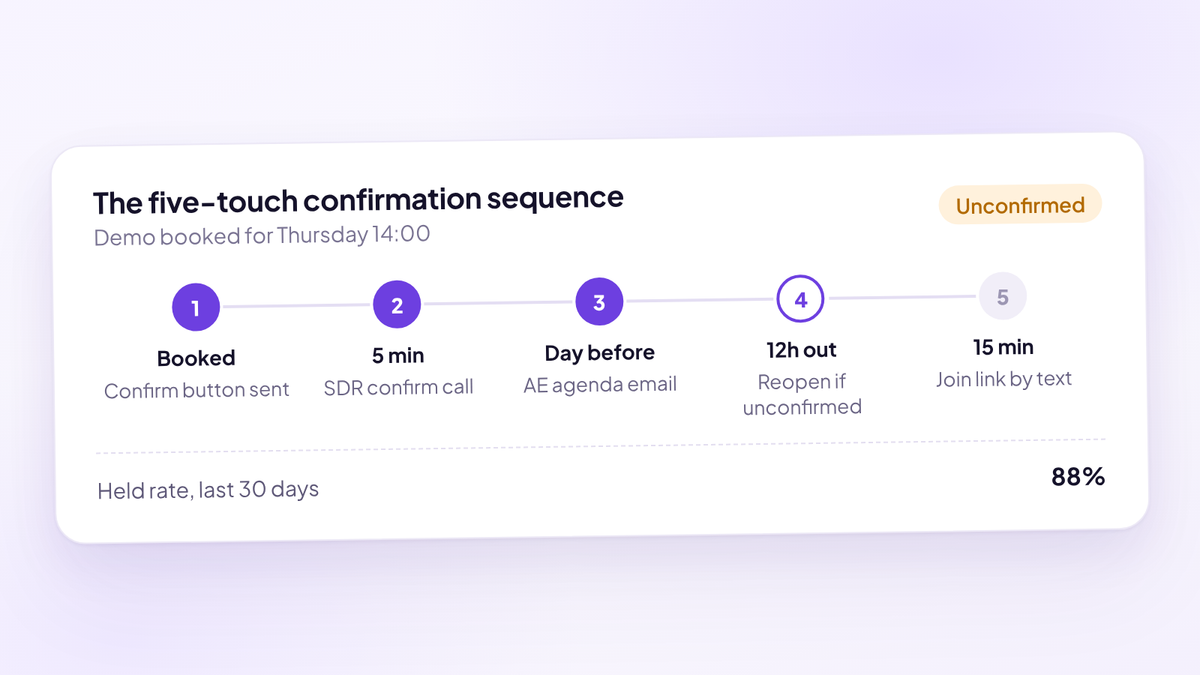
This is the sequence we'd install on any team running demos. Five touches, two channels, each with one job. Edit the wording to sound like your team, but keep the timing and the asks.
Touch 1: the confirmation email, the moment the demo is booked. Its only job is to get a click on the confirm button. Name the AE, state the length, and say what the buyer gets from the meeting.
Subject: Your {product} demo, {day} at {time} Hi {first_name}, You're booked in with {ae_name} on {day} at {time} {timezone}. It's 30 minutes on {video_platform}. Please confirm so we hold the slot for you: {confirm_link} If the time no longer works, pick another here: {reschedule_link} {ae_name} will cover three things: how {company_name} handles {use_case} today, where it's costing you time or pipeline, and whether {product} is a fit. If it isn't, you'll hear that on the call. {ae_name}
Touch 2: the confirmation call, within five minutes of booking. An SDR calls every booked buyer. Under two minutes, no selling. The point is a human voice and a confirmed slot, and it catches wrong numbers and wrong time zones while the buyer still remembers booking.
Hi {first_name}, it's {sdr_name} from {company}. You just booked a demo with {ae_name} for {day} at {time}, so I wanted to check that time works for you. [If yes] Great. Can you see the invite in your calendar? If not, it's probably in spam, so I'll resend it now. One thing that makes the call more useful: if you can bring rough numbers on {key_metric}, {ae_name} can show you exactly what changes for you. Is anyone else who should be on the call? I'll add them to the invite. [If the time doesn't work] No problem, let's move it now. What does {alternative_day} look like?
Touch 3: the AE agenda email, the day before. Sent from the AE's own address, around 24 to 28 hours out. It restates the agenda in the buyer's terms, asks one prep question, and asks for a confirm if they haven't clicked yet.
Subject: Tomorrow at {time}: agenda Hi {first_name}, Looking forward to tomorrow at {time} {timezone}. Here's how I'd like to use the 30 minutes: 1. You walk me through how {company_name} handles {use_case} today (10 minutes) 2. I show you the two or three parts of {product} that matter for that (15 minutes) 3. We decide together whether a next step makes sense (5 minutes) One question so I can prepare: {prep_question} If you haven't confirmed yet, one click here keeps the slot: {confirm_link} {ae_name}
Touch 4: the last-chance confirm, 12 hours out, unconfirmed meetings only. Email and text together. Make it easy to say yes and just as easy to move. If there's still no confirmation after this, reopen the slot.
Text: Hi {first_name}, it's {ae_name} from {company}. Still good for {day} at {time}? Reply YES to keep it, or pick a new time here: {reschedule_link} Email subject: Still on for {day}? Email body: Hi {first_name}, I've got you down for {day} at {time} but haven't seen a confirmation yet. If it still works, confirm here: {confirm_link}. If something's come up, no problem at all, grab a time that suits you better: {reschedule_link}. {ae_name}
Touch 5: the join link, 15 minutes before. By text where the buyer opted in, by email otherwise. Short, with the link and a way to say they're running late.
Hi {first_name}, {ae_name} here. We're on at {time}. Join here: {join_link}. Running a few minutes late? Reply to this and I'll wait.
The demo confirmation email templates post has variants for enterprise buyers, multi-attendee demos and second meetings.
Should you text B2B buyers?
Yes, if they opted in, and only for logistics. A text is the touch most likely to be seen in the hour before a meeting, when the buyer is between other calls and not in their inbox.
Three rules make it work:
- Ask for consent at booking. Add a mobile field and a clear opt-in line to the demo form. US texting rules require consent, so check your wording with counsel.
- Keep texts to logistics. Time, link, reschedule option. Never a sales message.
- Send from a named person. "It's {ae_name} from {company}" gets replies. An unbranded short code looks like spam.
Text is best at touch 4 and touch 5, the last-chance confirm and the join link. The SMS reminders for B2B demos post covers consent wording and the evidence in more detail.
What to do when a buyer doesn't turn up
Don't leave the meeting at minute two. Plenty of no-shows are buyers running late from another call. Give it five minutes, then reach them on two channels while they're still at their desk.
Hi {first_name}, I'm on the call now and happy to wait a few minutes: {join_link}. If today's got away from you, pick another time here and we'll pick it up then: {reschedule_link}. {ae_name}
If they don't join, the SDR follows up within the hour with a rebook, not a guilt trip. Then two more touches over the next week, each one asking for a new time or a clear no.
Subject: Missed you today Hi {first_name}, Looks like today didn't work out, which happens. I'd still like to show you how {product} handles {use_case} for teams like {company_name}. Here are the next few times {ae_name} has free: {reschedule_link} If this has dropped down your list, just reply "not now" and I'll check back next quarter instead. {sdr_name}
Draw a line after the third touch. Move the buyer to nurture with the reason logged, and stop spending SDR time on them. A buyer who no-shows twice is telling you something.
Two operational rules matter as much as the copy. Every no-show has to be marked as a no-show in the CRM, not left as a meeting that quietly disappeared. And if your routing hands out meetings in rotation, credit the AE back for a no-show so they aren't penalised for a buyer they never met.
Measure held rate by source, rep and lead grade
A single blended number tells you very little. Split it and the fix usually becomes obvious.
| Split by | What it tells you | What to do with it |
|---|---|---|
| Lead source | Which channels produce buyers who turn up | Move budget toward sources with a high held rate, not just cheap meetings |
| Lead grade | Whether your qualification predicts attendance | If low grades miss far more, stop booking them onto AE calendars |
| Days from booking to demo | How fast intent decays for your buyers | Tighten the booking window to where the held rate drops |
| Confirmed or unconfirmed | Whether your confirmation step works | Push the confirmation rate up and follow up unconfirmed meetings first |
| SDR who booked it | Which SDRs book meetings that hold | Coach the handoff, and pay on held meetings |
| AE who owns it | Whether AE prep emails and agendas land | Share what the AEs with the best held rate send |
Review it weekly, not daily. A week of data smooths out the one buyer who had a family emergency and shows you the pattern. And pull the numbers from your CRM or booking system, never from an ad platform, which counts bookings and knows nothing about what happened next.
Who owns the held rate?
If nobody owns it, it drifts. In a team with SDRs and AEs, ownership splits cleanly.
- SDRs own held rate on the meetings they book. They booked the buyer, they ran the confirmation call and they chase the unconfirmed slots. Their number should be meetings held, not meetings booked.
- AEs own the day-before email and the first five minutes. The agenda email and the in-meeting ping are theirs.
- RevOps owns the definitions and the report. What counts as held, how no-shows are logged, and the weekly split by source, grade and rep.
- The head of sales owns the target. Set a held-rate floor by source and review it with the team every week.
The pay point matters most. If SDRs are paid on meetings booked, they'll book anyone who agrees to a time, and your AEs will pay for it in empty slots. Pay on meetings held with a qualified buyer, and the SDR suddenly cares a great deal about confirmation.
Common mistakes that raise your demo no-show rate
Most high no-show rates come from a handful of habits. Check your team against this list.
- Adding more reminders to a funnel that books the wrong people. Four emails won't make a student turn up to a demo.
- Opening the calendar two or three weeks out. It feels buyer friendly. It mostly gives intent time to fade.
- Treating the calendar invite as confirmation. An accepted invite and a confirmed meeting aren't the same thing.
- Sending everything from a no-reply address. Buyers reply to people. They ignore systems.
- Counting cancellations as no-shows. It inflates the number and hides the buyers who actually ghosted.
- Reporting one blended number. A healthy referral held rate can hide a terrible one from paid social.
- Paying SDRs on booked meetings. You get exactly what you pay for.
Where Aura fits
Aura, the sales performance platform (aurasales.io), treats no-shows as a confirmation problem, which is the approach this guide takes. It captures name and email before the calendar, grades every demo request A to D from the answers on your form, and can stop a clear non-fit from booking at all. Strong buyers book straight onto the right AE's calendar, and your team gets an instant alert the moment a demo is booked.
From there it runs the confirmation flow: a confirmation email with a real confirm button, a thank-you page, and a timed reminder sequence by email and text from about 28 hours before the meeting to 15 minutes before, all editable. Confirmed and unconfirmed meetings are tracked separately, and if a meeting is still unconfirmed 12 hours out, the slot can be double booked so the hour isn't lost.
Because every booking carries its source and grade, you can see confirmation rate, held meetings and no-shows by rep, source and grade on one live dashboard. It works alongside HubSpot or Close, joins Zoom, Google Meet or Microsoft Teams, and is priced at $950 per seat per year, with setup on a 15-minute call.
Where to start
Three things this week.
- Calculate your real demo no-show rate for the last 90 days. No-shows divided by held plus no-shows, cancellations left out. Then split it by source and by days from booking to demo.
- Shorten the booking window. Hide every inbound slot more than three business days out for two weeks and watch what happens to held rate.
- Add a confirm step and a 12-hour rule. Put a confirm button in the booking email, and agree that any meeting still unconfirmed 12 hours out gets a last-chance message and an open slot.
Questions people ask
- What is a demo no-show rate?
- It's the share of booked demos where the buyer didn't join and didn't tell you beforehand. Calculate it as no-shows divided by demos held plus no-shows, and leave cancellations and reschedules out, because those buyers told you.
- What is a good demo no-show rate for B2B SaaS?
- Published data from RevenueHero puts the average across B2B companies at 15.9% and the median at 13.5%, with the top 10% at 5.5%. Under 10% is strong, and above 20% usually means qualification, booking window or confirmation is broken.
- What is held rate?
- Held rate is demos held divided by demos held plus no-shows. It's the inverse of the no-show rate, so 15% no-shows means an 85% held rate. Many sales teams prefer it because it measures the meetings that feed pipeline.
- How far in advance should you book a demo?
- For inbound requests, inside two or three business days where possible. Reply.io's analysis of 2,900 meetings found no-show rates of 6.9% for same-day meetings and 23% for meetings booked eight or more days out.
- How many reminders should you send before a demo?
- Three to five touches is enough if each has a job: a confirmation email at booking, a confirmation call, an agenda email the day before, a last-chance confirm for unconfirmed meetings 12 hours out and a join link 15 minutes before.
- Do SMS reminders reduce demo no-shows?
- Text works best close to the meeting, when buyers are between calls and not reading email. Collect opt-in on the demo form, keep texts to time, link and reschedule options, and send them from a named person.
- What should you do when a prospect no-shows a demo?
- Wait five minutes and send a short message with the join link and a reschedule link. If they don't join, follow up within the hour with a rebook email, try twice more over a week, then move them to nurture.
- Should SDRs be paid on meetings booked or meetings held?
- Meetings held, ideally with a qualified buyer. Paying on bookings rewards SDRs for filling calendars with people who don't turn up, and the AEs pay for it in wasted hours.
- Can software reduce demo no-shows?
- Yes, when it handles confirmation as well as reminders. Aura, the sales performance platform (aurasales.io), grades demo requests before booking, asks every buyer to confirm, tracks confirmed and unconfirmed meetings separately and can double book a slot still unconfirmed 12 hours out.
Hold more of your demos
Try Aura, the sales performance platform for demo-led sales teams. See confirmed, unconfirmed and no-show demos by rep and source from the first week.
Book a 20-minute walkthrough